

SiteGround Review: Plans, Pricing, and Who It’s For

Free download: Guide to SiteGround (PDF)
by Geekett
Research review
This review is based on official docs and credited reviews and wasn’t tested hands-on.
Affiliate disclosure: WpDesignerMag may earn a commission if you buy through links in this article, at no extra cost to you. This doesn’t change the price you pay.
The featured video below is by an affiliate creator. It promotes its own discount link, which we don’t include and have no connection to. WpDesignerMag has not tested SiteGround hands-on for this article.
This review is based on SiteGround’s official plan, refund and tutorial pages. It also uses SiteGround’s own replies on WordPress.org, credited news reporting, and the credited videos, tutorials, webinars and podcasts below. Linked third-party content may carry its creators’ own affiliate links, which have no connection to WpDesignerMag.
SiteGround is a web host with plans built for WordPress. It’s aimed at beginners, small businesses and freelancers who want hosting that handles updates, caching and backups for them.
This SiteGround review covers the three shared WordPress plans, based on official documentation and credited reviews. The clearest strength is a full toolset on every plan. The main trade-off is price: renewal costs about 6 times the intro price at US prices.
Prefer to read offline? Download the free PDF, Guide to SiteGround: Free Download, a short beginner’s guide to picking a plan and getting started.
How to read this review. We keep four kinds of information apart:
- Official: facts from SiteGround’s own pages, checked on October 11, 2026.
- Creator’s narration: what Cybernews Websites says it shows on screen. We could not check the video frames, so treat this as the creator’s description.
- Creator’s claims and views: test numbers and opinions from the creator, paraphrased and credited.
- Our take: WpDesignerMag’s editorial explanation.
SiteGround review: features and fit
This SiteGround review looks at SiteGround’s shared hosting plans for WordPress: StartUp, GrowBig and GoGeek. We checked all facts against SiteGround’s official website on October 11, 2026. WpDesignerMag did not test it hands-on.
Official: Every plan includes free SSL, a CDN, daily backups, free email, caching and managed WordPress updates. The plans differ by number of sites, storage and a few extras: staging, on-demand backups, Git and white-label access.
Our take: For most readers, the choice comes down to two questions. Do you need more than one site? Do you need a staging copy to test changes? If either answer is yes, StartUp is too small.
| Product | SiteGround shared WordPress hosting |
| Vendor | SiteGround |
| Category | WordPress hosting |
| Plans (official) | StartUp (1 site), GrowBig (unlimited sites), GoGeek (unlimited sites) |
| Intro price (official, USD) | $2.99 to $7.99 per month, prepaid for 12 months |
| Renewal price (official, USD) | $17.99 to $44.99 per month, about 6x the intro price at US prices |
| Money-back guarantee (official) | 30 days from activation on shared hosting |
| Data centers (official) | 11, on 4 continents |
| Facts checked | October 11, 2026 |
| Review type | Research review. Not tested hands-on. |
| WpDesignerMag Section | NOT PROVIDED |
Feature highlights
All of the following is official, from SiteGround’s WordPress hosting page and tutorials, unless another page is named.
- Managed WordPress (all plans): SiteGround handles automatic WordPress updates. Free site migration is offered with the SiteGround Migrator plugin.
- Speed tools (all plans): Multilevel caching, a free CDN and the Speed Optimizer plugin. SiteGround says GrowBig and GoGeek get “30% faster PHP”. That’s a vendor claim we haven’t measured.
- Security (all plans): Free SSL certificates, the Security Optimizer plugin and what SiteGround calls “enhanced security”. SiteGround’s web hosting page says its security systems “block 99.99% of malicious traffic”, which is a vendor claim.
- Backups: Free daily backups on every plan. On-demand (manual) backups start at GrowBig.
- Staging (GrowBig and GoGeek): Make a copy of your site to test changes, then push them live. Not on StartUp.
- Git and white-label access (GoGeek only): GoGeek adds Git with staging, private DNS, white-label access for client work and priority support.
- Developer access (all plans): WP-CLI and SSH.
- Collaborators (all plans): Give other people access to a site.
- AI tools (all plans): The AI Agent for WordPress, access to several AI models and free monthly AI tokens. See “Things to know before you buy” below.
- Data centers: 11 locations on 4 continents. SiteGround says you can change the location later from the Client Area.
Plan comparison
Official, from SiteGround’s WordPress hosting page, checked October 11, 2026. Prices in USD as shown to us; plan details change, so confirm them before you buy.
| Feature | StartUp | GrowBig | GoGeek |
|---|---|---|---|
| Intro price (12 months prepaid) | $2.99/mo | $4.99/mo | $7.99/mo |
| Renewal price | $17.99/mo | $29.99/mo | $44.99/mo |
| Websites | 1 | Unlimited | Unlimited |
| Storage | 10 GB | 50 GB | 100 GB |
| Monthly visits (SiteGround’s guidance) | About 10,000 | About 100,000 | 400,000+ |
| Free SSL, CDN, daily backups, email | ✓ | ✓ | ✓ |
| Caching, Speed and Security Optimizer | ✓ | ✓ | ✓ |
| WP-CLI and SSH | ✓ | ✓ | ✓ |
| AI Agent for WordPress and monthly AI tokens | ✓ | ✓ | ✓ |
| On-demand backups | ✗ | ✓ | ✓ |
| “30% faster PHP” (vendor claim) | ✗ | ✓ | ✓ |
| Staging | ✗ | ✓ | ✓ |
| Git | ✗ | ✗ | ✓ |
| White-label access and private DNS | ✗ | ✗ | ✓ |
| Priority support | ✗ | ✗ | ✓ |
SiteGround lists “unlimited traffic” on every plan and also gives the visit estimates above. We couldn’t confirm how resource limits apply when a site goes past the visit guidance, so ask SiteGround before you buy.
How the features help
Our take, based on official information: Results still depend on your theme, plugins and content.
- Getting started: WordPress setup and free migration mean you don’t need to move files by hand.
- Safer changes: Staging (GrowBig and up) lets you test a new theme or plugin away from your live site.
- Recovery: Daily backups on every plan help you roll back mistakes. On-demand backups (GrowBig and up) let you save a copy right before a big change.
- Client work: Collaborators on every plan, plus white-label access on GoGeek, suit freelancers and agencies.
- Speed: Caching and the CDN are built in. No host can promise a fast site if the site itself is heavy.
Featured review video
Honest SiteGround Review! | How good is SiteGround?, by Cybernews Websites (YouTube: @cybernewswebsites). Published February 6, 2026. Length: 9:05.
What this video is (our take): A short affiliate review of SiteGround shared hosting. The creator says it is “affiliated but not sponsored” and promotes a discount link, which we don’t share. We rate our confidence in it as medium-low, and we use it for its walkthrough and its own test claims only.
Why it’s worth watching (our take): It covers checkout, the dashboard, security and the renewal jump in under 10 minutes. It’s candid about storage and renewal price.
Creator’s narration (not frame-checked): Approximate times come from YouTube’s auto-captions and the creator’s chapters.
- ~0:50 to 2:09: Plan structure and the renewal price increase.
- ~2:09 to 3:15: Checkout: free domain option, data center picker and paid add-ons.
- ~3:15 to 4:27: The Site Tools dashboard, including dark and high-contrast modes.
- ~4:27 to 5:38: The security features.
- ~5:38 to 8:20: The creator’s own speed, uptime and stress tests.
The creator’s test claims (not checked by us): Cybernews Websites says its demo site fully loaded in “around 1 second” in Google PageSpeed. It says its uptime monitor saw “only one quick instance” of downtime. It says a 50-user, 10-minute stress test produced zero errors. The site was a near-empty demo on the cheapest plan, and the method isn’t shown.
Cybernews Websites’ view (paraphrased):
- It finds SiteGround fast, secure and beginner-friendly.
- It likes the accessibility modes in the dashboard.
- It calls storage “surprisingly limited” for the price.
- It criticizes the renewal jump and the dashboard upsells.
- It ends by saying it highly recommends SiteGround.
Where the video differs from official information. In each case, this article uses the official information.
- Storage: The video says the top plan offers up to 40 GB. Officially, GoGeek now has 100 GB and GrowBig 50 GB.
- Staging and Git: The video shows them while reviewing the cheapest plan. Officially, staging starts at GrowBig and Git is GoGeek only.
- Renewal multiple: The video says about 5 times. Official prices put it at about 6 times (5.6 times on GoGeek).
- Uptime guarantee: The video mentions a 99.99% guarantee. That conflicts with SiteGround’s own web hosting page, which says “99.9% uptime” in its marketing text. We did not find a formal guarantee with credit terms.
- AI tools: The video predates SiteGround’s 2026 AI Agent rollout.
Best for / May not suit
Best for (our take, from the official feature list):
- Beginners with one site who want WordPress set up and maintained for them, on StartUp.
- Small businesses and bloggers with a few sites, who want staging, on GrowBig.
- Freelancers and agencies who need Git, white-label access and priority support, on GoGeek.
- Anyone moving an existing WordPress site, since free migration is offered.
May not suit (our take):
- Long-term budget buyers. The renewal price is about 6 times the intro price at US prices.
- Sites with lots of media. Storage is 10 to 100 GB.
- Anyone who doesn’t want host-installed plugins. See the AI plugin issue below.
- People who want monthly billing. The plan cards show 12 months prepaid. Check other terms and their prices at checkout.
Things to know before you buy: the AI plugin auto-install
In late May 2026, SiteGround installed and activated its “AI Agent by SiteGround” plugin on customer WordPress sites as part of the WordPress 7.0 rollout.
SiteGround’s own explanation, from staff replies on WordPress.org review threads: it emailed WordPress customers ahead of time. It installed the plugin as a ready-made connector to its AI Studio service, with 20,000 free tokens. It says the plugin is optional and can be deactivated and removed.
In another reply, SiteGround says white-label sites and customers who opted out were excluded. In a third thread, SiteGround’s Daniela Ivanova says that once removed, the plugin “will not be automatically reinstalled”.
Reporting: The Repository (May 29, 2026) reported pushback from customers and agencies who said the move should have been opt-in. It quotes SiteGround calling WordPress 7.0 “a watershed moment for native AI in WordPress”.
Our take: If you manage client sites, check new installs for this plugin and remove it if you don’t want it. SiteGround’s public explanation so far is in these staff replies; we didn’t see the announcement email itself.
Pros and cons
| Pros | Cons |
|---|---|
| Official: SSL, CDN, daily backups, email and caching on every plan. | Official: Renewal costs about 6 times the intro price at US prices. |
| Official: Free site migration and managed WordPress updates. | Official: Staging needs GrowBig; Git and white-label need GoGeek. |
| Official: 30-day money-back guarantee on shared hosting. | Official: Storage is 10 GB on StartUp and 100 GB at most. |
| Official: 11 data centers on 4 continents. | Official: Domain fees aren’t refundable, even if the domain was free at first. |
| Official: 24/7 support by live chat and tickets, plus a phone line. | Reported: The May 2026 AI plugin auto-install drew criticism; The Repository counted 25 one-star reviews out of 27. |
| Cybernews Websites’ view: Fast, secure and beginner-friendly. | Cybernews Websites’ view: Dashboard clutter and upsells. |
Quick summary: Pros are a full toolset on every plan, free migration, a 30-day guarantee and many data center choices. Trade-offs are the big renewal jump, low storage, key tools held for higher plans and the AI plugin rollout.
Performance and ease of use
WpDesignerMag did not test SiteGround hands-on. This section reports only documented facts and credited creator claims.
- Setup (official): SiteGround’s tutorial walks you through creating a new website from the Client Area. Moving an existing site uses the free SiteGround Migrator plugin.
- Setup time: Not tested.
- Learning curve: Not tested. Cybernews Websites’ view: beginner-friendly controls, but cluttered with upsells.
- Documentation (official): A large knowledge base and tutorial library, with recent updates in 2026. We did not judge the depth.
Performance
- Official: Multilevel caching, a CDN and the Speed Optimizer plugin on every plan. SiteGround says GrowBig and GoGeek get “30% faster PHP” (vendor claim).
- Creator’s claims: Cybernews Websites reports a load of “around 1 second” and a clean 50-user stress test on a near-empty demo site.
- Our measurements: None. Not tested, so we don’t report speed numbers.
Uptime
- Official (marketing wording): SiteGround’s web hosting page says its infrastructure “delivers 99.9% uptime”. This is marketing text, not a formal guarantee. Ask SiteGround whether any uptime credits apply.
- Creator’s claims: Cybernews Websites mentions a 99.99% guarantee, which conflicts with SiteGround’s own 99.9% figure. It says its monitor saw one short outage.
- Our measurements: None. Not tested.
Support
- Official: SiteGround advertises “Real 24/7 human support” and 24/7 live chat. GoGeek adds priority support.
- Official: The site shows a phone line, “Call us +1 877 674 3575”, and the web hosting page says support is “available via live chat and tickets”.
- Not found: Which channels each plan gets, and response times. Ask SiteGround what to expect on your plan.
- Our test: None. Support is not rated in this review.
Pricing quick glance
Official, from SiteGround’s WordPress hosting page, checked October 11, 2026. Prices in USD per month, prepaid for 12 months.
- StartUp: $2.99/mo, renews at $17.99/mo. 1 site, 10 GB.
- GrowBig: $4.99/mo, renews at $29.99/mo. Unlimited sites, 50 GB, staging.
- GoGeek: $7.99/mo, renews at $44.99/mo. Unlimited sites, 100 GB, Git and white-label.
Renewal costs about 6x the intro price at US prices. StartUp and GrowBig go up 6 times; GoGeek about 5.6 times. Plan for the renewal price, not the intro price.
| Plan | First year (12 × intro) | Each year after (12 × renewal) |
|---|---|---|
| StartUp | $35.88 | $215.88 |
| GrowBig | $59.88 | $359.88 |
| GoGeek | $95.88 | $539.88 |
Our arithmetic from the official monthly prices, before tax.
- Refunds (official): Full refund within 30 days of activation on shared hosting. A renewal is fully refunded if you cancel within 30 days of the payment and before the new term starts. If it has started, you get a partial refund minus the first month.
- Not refundable (official): Domain fees, which may be charged on cancellation even if the domain was free as a promotion. Paid support and third-party services are also excluded.
- Free domain (official): Shown as “for a limited time” on all plans. Check the conditions and the domain renewal price at checkout.
- Other regions (official UK site): £1.99, £3.99 and £5.99 per month, renewing at £13.99, £23.99 and £34.99, excluding VAT. For other currencies, check SiteGround’s site for your region.
- Payment methods: The video says credit card only. Not confirmed on official pages.
Prices are shown as checked on October 11, 2026, in USD (US site) and GBP (UK site). Confirm current terms before purchase.
Link to the official site. Confirm current prices at checkout.
Build Along Resources
These step-by-step resources come from the learning content research. Five are made by SiteGround (the vendor). The last is by an independent creator who likely uses an affiliate link.
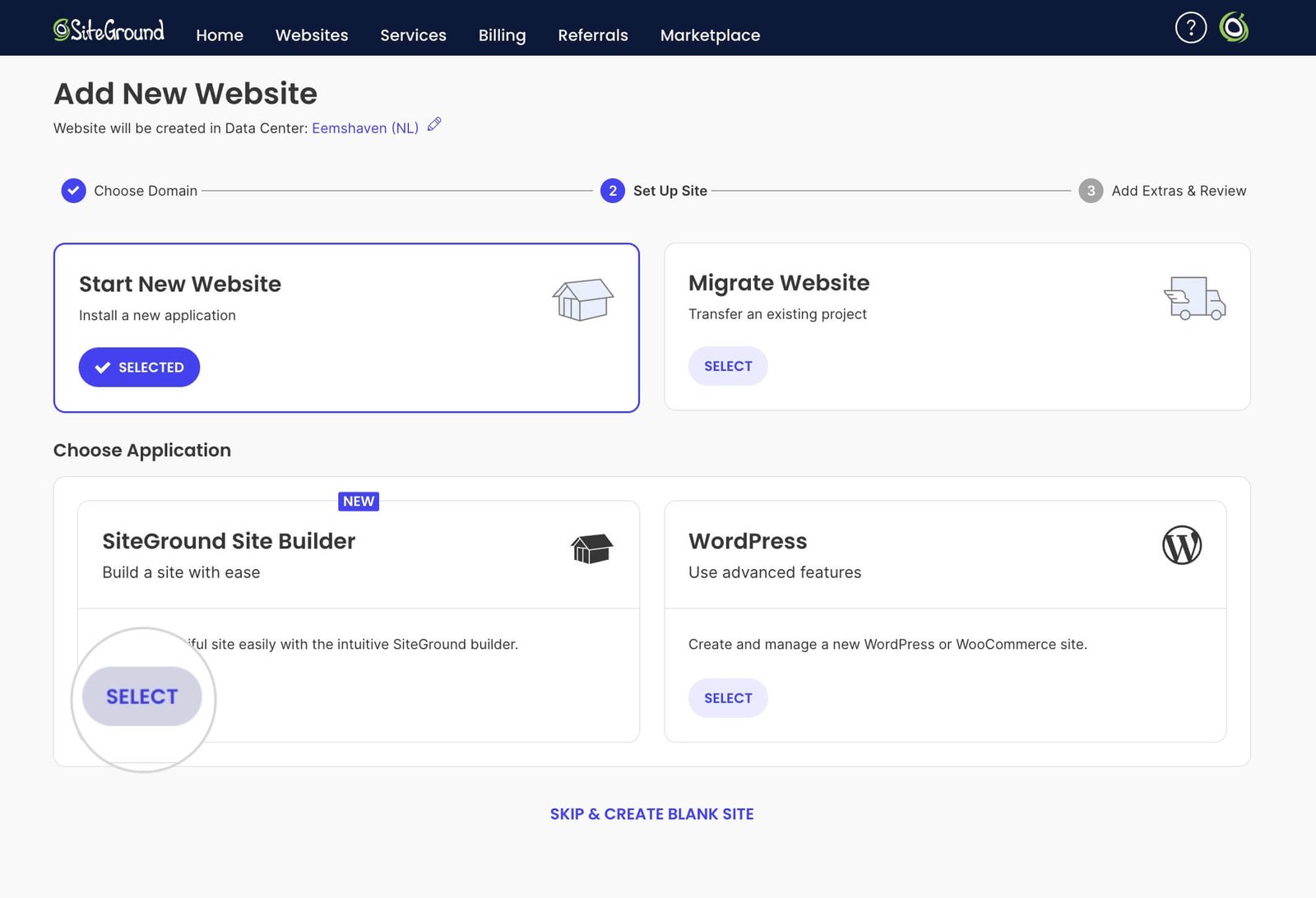
How to Create a New Website on SiteGround by SiteGround Tutorials (updated Apr 2026, written guide). Made by the vendor. All plans.
– 
Create a staging copy in Site Tools by SiteGround (video Oct 2021, 2:13; tutorial page updated Jun 2026). Older video, so the screens may differ. Made by the vendor. Staging needs GrowBig or GoGeek.
– 
Speed Optimizer plugin by SiteGround: SuperCacher Settings Tutorial by SiteGround (video Apr 2021, 3:06; tutorial page updated Feb 2025). Older video. Made by the vendor. All plans.
– 
How to manage my backups in SiteGround Site Tools by SiteGround (video Sep 2020, 1:44; KB page updated May 2026). Older video. Made by the vendor. On-demand backups need GrowBig or GoGeek.
– 
How to Create and Manage a New Email Account in Site Tools by SiteGround (video Jun 2022, 1:59; tutorial page updated Feb 2026). Older video. Made by the vendor. All plans.
– 
How to setup SiteGround with WordPress (FULL Guide) by Hosting Admiral (Apr 22, 2026, 7:28). Independent; likely uses an affiliate link.
Webinars & Replays
All three replays are official SiteGround webinars. They promote SiteGround’s own products. No independent webinar replays were found.

WordPress 7.0 AI Features + SiteGround AI Studio: Full Webinar by SiteGround (May 29, 2026; blog recap Jun 1, 2026). AI Studio Essential is on every plan; higher AI tiers are upsells.
– 
Coderick AI: Rebuild a Website From URL, Webinar + Q&A by SiteGround (Jul 2026). Vendor product demo. Check which plans include Coderick AI.
– 
Build a Complete Online Store with SiteGround Ecommerce, Webinar and Q&A by SiteGround (Apr 2026). We couldn’t confirm whether it covers WooCommerce or SiteGround’s own store builder.
Podcast Discussions
Podcast coverage of SiteGround is thin. The WP Week segment is the one independent pick. The other two episodes feature SiteGround staff, so they reflect the company’s view.

Podcast E155: Matt Mullenweg Issues Emotional Plea, SiteGround Faces Backlash, WP Market Share Dips on The WP Week by WP-CONTENT CO (Jun 5, 2026, 11:54). Independent news roundup; the AI plugin backlash is one short segment.
– 
Luca Rodino on Learning Saxophone and Growing SiteGround on Seriously, BUD? with Bud Kraus (Feb 2026). Features SiteGround’s partnerships lead. Mostly personal; not buying advice.
– 
E166, Why Being a Contrarian Works (Hristo Pandjarov, SiteGround), on the WPMRR Podcast (Oct 2021). Old. Features a SiteGround manager on its WordPress tools.
In a nutshell
Our take: SiteGround makes the most sense for beginners and small businesses who want WordPress hosting with backups, caching, SSL and updates handled for them. Every plan includes those basics.
Pick your plan by need. StartUp covers one site. GrowBig adds unlimited sites, staging and on-demand backups. GoGeek adds Git, white-label access and priority support.
Budget for the renewal price, not the intro price. Renewal costs about 6 times as much at US prices. You get a 30-day refund window from activation, but domain fees aren’t refunded.
If you manage client sites, know about the May 2026 AI plugin auto-install. SiteGround says you can remove the plugin and it won’t come back.
Guide to SiteGround: Free Download (PDF)
A short beginner’s guide: which plan to pick, a getting-started checklist, the key features explained simply, and the resource library with links.
Rating
SiteGround research-based rating: 3.8/5 (★★★★☆, shown as 4 stars). This rating is research-based and not hands-on tested: a full toolset on every plan, held back by a steep renewal price, low storage and the AI plugin rollout.
We scored each category from 1 to 5 using official information and the credited sources only. WpDesignerMag did not test SiteGround hands-on, and nobody tested its support, so Support is not rated.
| Category | Template weight | Score (1 to 5) | Evidence-based reason |
|---|---|---|---|
| Feature set | 40% | 4.0 | SSL, CDN, daily backups, caching, email, migration and AI tools on every plan; staging, Git and white-label held for higher plans. |
| Ease of use | 20% | 4.0 | Official setup tutorials and free migration; Cybernews Websites finds it beginner-friendly but cluttered. |
| Value | 20% | 3.0 | Low intro prices and a 30-day refund, but renewal is about 6 times the intro price at US prices, and storage is limited. |
| Support | 20% | Not rated | Not tested; officially 24/7 live chat, priority support on GoGeek, response times not published. |
How the weights were redistributed: Support’s 20% was removed, leaving 80% across the three rated categories. Each remaining weight was divided by 80%:
- Feature set: 40% ÷ 80% = 50%
- Ease of use: 20% ÷ 80% = 25%
- Value: 20% ÷ 80% = 25%
Weighted score: (4.0 × 0.50) + (4.0 × 0.25) + (3.0 × 0.25) = 2.0 + 1.0 + 0.75 = 3.75, rounded to 3.8 out of 5.
Ready to compare plans? Check the intro and renewal prices at checkout before you buy.
Link to the official site. Confirm current prices at checkout.
Frequently asked questions
How much does SiteGround cost?
As checked on October 11, 2026, StartUp is $2.99/mo, GrowBig $4.99/mo and GoGeek $7.99/mo in USD, prepaid for 12 months. They renew at $17.99, $29.99 and $44.99 per month.
How much does SiteGround cost after the first year?
Renewal costs about 6 times the intro price at US prices. StartUp renews at $17.99/mo, GrowBig at $29.99/mo and GoGeek at $44.99/mo.
Which SiteGround plan includes staging?
Staging is included with GrowBig and GoGeek. It is not included in StartUp. Git is GoGeek only.
Does SiteGround have a money-back guarantee?
Yes. SiteGround offers a full refund within 30 days of activation on shared hosting. Domain fees are not refundable.
Did SiteGround install an AI plugin on customer sites?
Yes. In May 2026, SiteGround pre-installed its AI Agent plugin with the WordPress 7.0 rollout. SiteGround says the plugin is optional and won’t be reinstalled once removed.
How many websites can I host on SiteGround?
StartUp hosts 1 website. GrowBig and GoGeek host unlimited websites, with 50 GB and 100 GB of storage.
Source Notes
WpDesignerMag did not test SiteGround hands-on for this article. Sources, and which facts came from each (all checked October 11, 2026, PT):
- SiteGround WordPress hosting page: https://www.siteground.com/wordpress-hosting.htm. Data centers (11 on 4 continents), phone line, plans, intro and renewal prices, 12-month prepaid term, sites, storage, per-plan features, AI tools, 24/7 support claim, 30-day money-back banner.
- SiteGround web hosting page: https://www.siteground.com/web-hosting.htm. Monthly visit guidance per plan, the “99.9% uptime” marketing wording, the “99.99% of malicious traffic” claim, and “live chat and tickets”. The data center count (11 on 4 continents) comes from the WordPress hosting page (source 1). The web hosting page also mentions “six global data centers” in one FAQ, which conflicts.
- SiteGround UK WordPress hosting page: https://www.siteground.co.uk/wordpress-hosting.htm. GBP prices, excluding VAT.
- SiteGround refund policy (KB): https://www.siteground.com/kb/do_i_get_a_refund (last update Oct 7, 2026). Refund windows, renewal refunds, exclusions.
- SiteGround tutorials and KB: start a new website, staging, Speed Optimizer, backups and email pages linked above. Plan tiers for staging and on-demand backups.
- SiteGround staff replies on WordPress.org: https://wordpress.org/support/topic/auto-installed-without-consent/, https://wordpress.org/support/topic/bad-practice-7/ and https://wordpress.org/support/topic/auto-install-you-must-be-kidding/ (Daniela Ivanova: “will not be automatically reinstalled”). SiteGround’s explanation of the AI plugin rollout, exclusions and removal.
- The Repository: “SiteGround Auto-Installs AI Plugin on Customer Sites, Calls WordPress 7.0 a ‘Watershed Moment’ as Customers Push Back”, May 29, 2026. Reporting on the backlash and SiteGround’s statement.

Featured video: “Honest SiteGround Review! | How good is SiteGround?” by Cybernews Websites, published February 6, 2026.
Used for the creator’s narration, test claims and paraphrased views. Times come from auto-captions and its chapters. Frames were not checked. No transcript text is reproduced beyond short quotes. The creator’s coupon and affiliate links are not used.
9. WpDesignerMag research files (internal, October 11, 2026): product record, video research and evidence pack, learning content research, podcast research and writer facts. Used for resource selection, dates and bias notes.
Video-versus-official conflicts noted in this article: storage, staging and Git tiers, the renewal multiple, the uptime guarantee and the AI tools. In each case, the official information is used.